
How to Search Cases by Name
Start at Kansas Judicial Branch CaseSearch. Accept the public-access terms if the prompt appears, then set the court to District. Choose Chautauqua County once the county field opens. Pick the case category that fits and type the indexed name. No account is needed for a guest search.
- Choose District rather than Appellate.
- Select the party-name search type and enter the legal spelling.
- Set Chautauqua County and add a case type when known.
- Use a filing-date range to reduce common-name results.
- Review the case number, type, status, judge, and events before deciding it is the right case.
Businesses go by the name used in the filing. If punctuation or a suffix blocks the match, shorten the term and try again.
Chautauqua County Search Fields
The new CaseSearch shows fields that shift with the court and search type you pick. Filling every box is rarely smart. Begin with one strong identifier, then add filters only if the results come back too broad.
| Field | Use | Required |
|---|---|---|
| Court | District or Appellate | Yes |
| Search Type | Party, case number, citation, or available option | Yes |
| Search Term | The chosen name, number, or citation | Yes |
| County | Chautauqua for a district case | Conditional |
| Case Type | Civil, Criminal, Family, or Probate/Mental Health | No |
| File Date From/To | Limits the filing period | No |
Some workflows offer a date-of-birth field and extra filters. Stick to facts you already know from the case.
How to Search by Case Number
For a clean Chautauqua County case lookup, nothing beats a full Odyssey case number. Current Kansas numbers combine a county abbreviation, the year, a case type, and a six-digit sequence. Chautauqua's code is CQ. A criminal docket number looks like CQ-2026-CR-000123. That sequence is only an illustration. Type the whole number first. If nothing comes back, check each zero, hyphen, year, and type code. Older records may follow a legacy style. The official Smart Search guidance spells out current formats and why older converted documents may be missing from the web.
CQ Codes in Case Lookup
The county code keeps Chautauqua County filings from blending into other Kansas court records. Those letters name the filing county. A case-type code marks the docket family. CR is the common marker for a criminal action. Civil, domestic, limited, probate, and other categories each carry their own codes.
- CQ
- Chautauqua County in the Odyssey number.
- Case type
- The code that places the action in its docket family.
- Sequence
- The six-digit filing number for the year and type.
- Citation number
- A ticket identifier that is not the same as a district case number.
Never squeeze a city citation into the CQ format. A municipal case reaches district court only if it is filed or appealed there.
What a Case Search Shows
A Chautauqua County case search returns public case information, not every filed image. Use it to confirm the case and trace its public events.
| Case Number | The court's indexed identifier. |
|---|---|
| Case Type | The civil, criminal, family, probate, or other category. |
| Parties | Names shown in the public index when disclosure is allowed. |
| Judge | The assigned judicial officer. |
| Filing Date | The date the court opened the action. |
| Status | The portal's current public status label. |
| Events | Hearings, filings, and orders listed in time order. |
What you see on screen is not a certified record. Ask the district clerk for a copy when the document itself matters.
CaseSearch Replaced the Old Portal
Kansas launched the current CaseSearch in 2025, retiring the older District Court Public Access Portal. The upgrade brought more search types, event filtering, and deeper financial detail. It also opened a separate expanded-access path through ID.me. Guest searching still works at the public entry point. Local access survived the switch. Public records absent from the web can still be viewed at a courthouse terminal when the law allows it. Sealed material stays unavailable. Authorized filers use Kansas eFiling at the filer portal. That portal is no substitute for a public docket search.
County vs Statewide Case Search
Chautauqua County keeps no separate public database of district cases. The statewide portal provides the online index, while the Sedan clerk and the courthouse terminal carry the official local path. The 14th Judicial District calendar lists hearing settings but holds no party-name database.
| Channel | Best for | Limit |
|---|---|---|
| CaseSearch | Name, number, citation, status, and events | Not every image appears |
| 14th JD calendar | Upcoming and past public settings | Not the complete events index |
| Sedan terminal | Public images missing from the web | Requires courthouse access |
| District clerk | Copies, certification, and correction routing | Record searches require a written request |
Each channel fills a different gap. None replaces a certified file.
When Chautauqua County Search Fails
Recheck spelling, court level, county, case type, year, hyphens, and leading zeroes. Drop extra filters. Widen the filing period. A city police citation belongs with the municipal clerk. City cases may not be indexed in the district portal. For district material, call 620-725-5870 to learn the right process. Then use the public terminal or send a focused written request. The clerk sits on the third floor of the Chautauqua County Courthouse. The address is 215 N Chautauqua St, Sedan. Weekday hours run 8:00 a.m. to noon and 1:00 to 4:00 p.m.
Restricted Cases and Access Rules
Some index facts show up publicly while document images stay off the web. Converted pre-Odyssey documents, along with public documents in juvenile-offender, domestic, guardianship, or guardianship/conservatorship matters, may require a trip to the courthouse terminal. Adoption files, sealed material, expunged records, protected investigations, and grand-jury records can be unavailable entirely.
Web absence has several meanings. It can reflect a format error, old converted material, a city-level case, a restricted category, expungement, or sealing. Do not label a case sealed based only on one failed search.
Before you dig in, read the public-access agreement, which limits how portal data may be used and notes that the online result is not the official record. For written requests and copies, see the Chautauqua County court record search.
City Cases Need a Different Lookup
CaseSearch handles Kansas district and appellate cases. City matters are different. Sedan runs its own municipal schedule and a way to pay fines. Cedar Vale, Chautauqua, Peru, and Niotaze offer no online docket portal at all. So a city ordinance or city-traffic question starts at that city's hall, not the county system.
A municipal case can climb into Chautauqua County District Court on appeal under K.S.A. 22-3609. Until then, a hunt for a CQ number may come up empty. The matter never left the municipal court. Once it moves, the district case follows the normal county docket route.
Read the citation or notice closely. Use the exact court name it prints. Hand the city clerk that identifier just as written. Forcing it into the CQ Odyssey format will only misfire. If the clerk confirms an appeal or district filing, ask for the new district case number. Then rerun your county docket search from scratch.
Two Chautauqua County Search Limits
One side tool deserves a mention. The Kansas new civil filings page lists certain civil filings briefly, before they are accepted. It is not a real case docket, and it cannot replace CaseSearch.
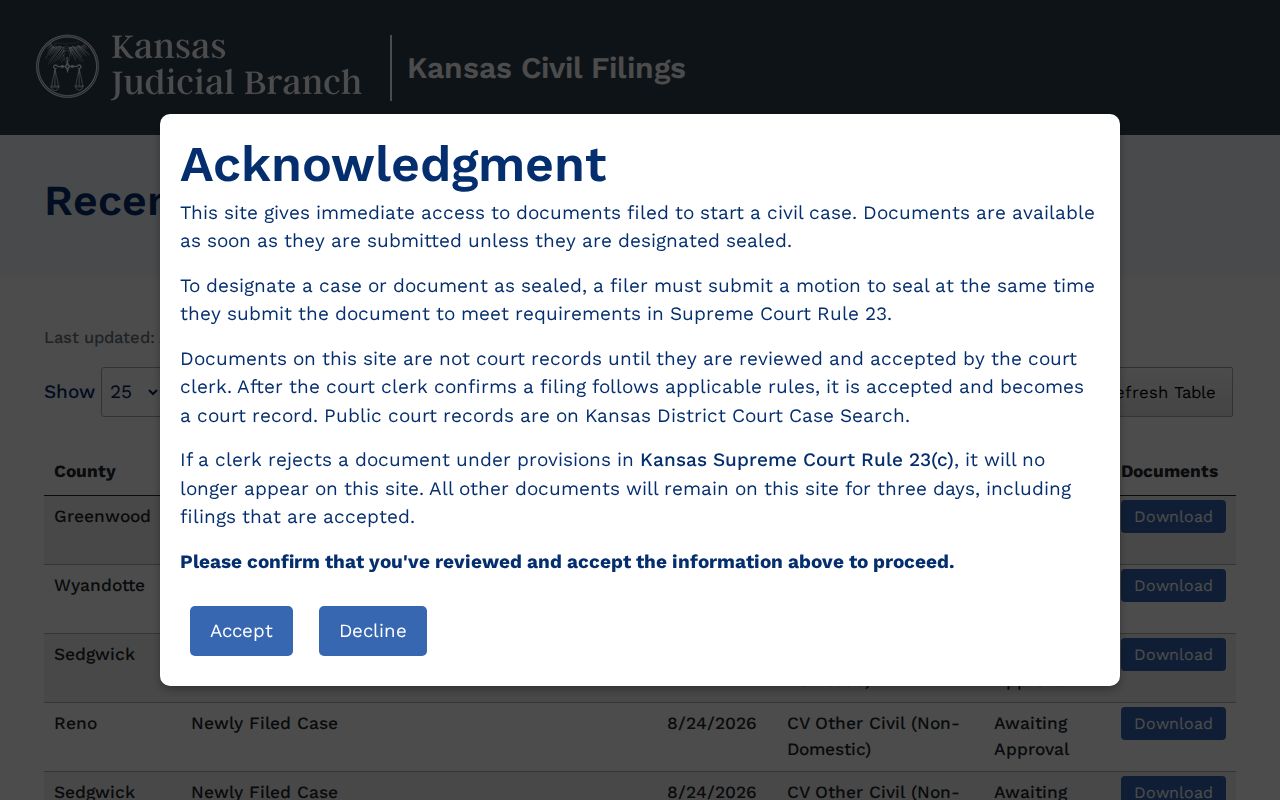
A filing sits there for three days unless rejected under Rule 23(c). That screen proves nothing about acceptance, so confirm in the district case system. Meanwhile, the public-access terms say it plainly: web results are general case information, not the official record.
Each surface serves a different moment in the process. Neither one turns an online screen into a certified Chautauqua County court file.